


API Mastery: REST & Security#
Introduction#
In modern software development, APIs (Application Programming Interfaces) are the bridges that connect different software components. Whether you are building a mobile app, a web frontend, or a microservice architecture, the API is the backbone of your system.
While creating an API that “works” is relatively easy, designing one that is scalable, secure, and easy to use is a significant challenge. This guide covers the essential pillars of professional API development: RESTful design principles, solid security with JWT, robust Rate Limiting, and clear Documentation.
RESTful API Design#
REST (Representational State Transfer) is the most popular architectural style for web APIs. It relies on standard HTTP methods and status codes to manage resources.
REST Principles#
To thrive in the API world, you must understand these core principles:
Resource-Based: APIs should expose “resources” (nouns), not actions (verbs).
Bad:
/getAllUsers,/createUserGood:
/users(GET for list, POST for creation)
Statelessness: The server should not store any client context between requests. Every request must contain all the information needed to process it (e.g., authentication tokens).
Uniform Interface: Resources should be uniquely identified (URIs) and manipulated through standard representations (JSON).
API Design Best Practices#
Use Standard HTTP Methods:
GET: Retrieve resources.POST: Create a new resource.PUT: Update a resource (full replacement).PATCH: Update a resource (partial update).DELETE: Remove a resource.
Return Correct Status Codes:
200 OK: Success (GET, PUT, PATCH).201 Created: Resource successfully created (POST).400 Bad Request: Invalid input.401 Unauthorized: Missing or invalid authentication.403 Forbidden: Authenticated but not allowed (permission issue).404 Not Found: Resource does not exist.500 Internal Server Error: Server blew up.
Versioning: Always version your API to prevent breaking changes for clients.
Example:
/api/v1/products
Rate Limiting#
Why Rate Limiting?#
Imagine a user (or a bot) sending 10,000 requests per second to your login endpoint. This could crash your database or slow down the service for everyone else.
Rate Limiting controls the number of requests a client can make within a specific timeframe (e.g., 100 requests per minute). It protects against:
DDoS Attacks: Overwhelming the server.
Brute Force Attacks: Guessing passwords.
Resource Starvation: Ensuring fair usage for all users.
Implementation Strategies#
Fixed Window: “100 requests per hour”. The counter resets at the top of the hour. Simple but can have “burst” issues at the window boundary.
Sliding Window: Smoother approach, calculating the rate based on the last X minutes.
Token Bucket: Analogy of a bucket filled with tokens at a constant rate. Each request costs a token. If the bucket is empty, the request is rejected (
429 Too Many Requests).
API Documentation#
Good code is useless if no one knows how to use it. Documentation should be comprehensive and up-to-date.
OpenAPI / Swagger#
OpenAPI Specification (OAS) is the industry standard for describing REST APIs. Swagger UI turns that specification into an interactive webpage where developers can test endpoints directly.
Benefits:
Automation: Generate clients (SDKs) and server stubs automatically.
Interactivity: Try out the API without writing code.
Clarity: Defines exactly what request body is expected and what response will be returned.
Example Specification (YAML)#
openapi: 3.0.0
info:
  title: Sample API
  version: 1.0.0
paths:
  /users:
    get:
      summary: Returns a list of users
      responses:
        "200":
          description: A JSON array of user names
          content:
            application/json:
              schema:
                type: array
                items:
                  type: string
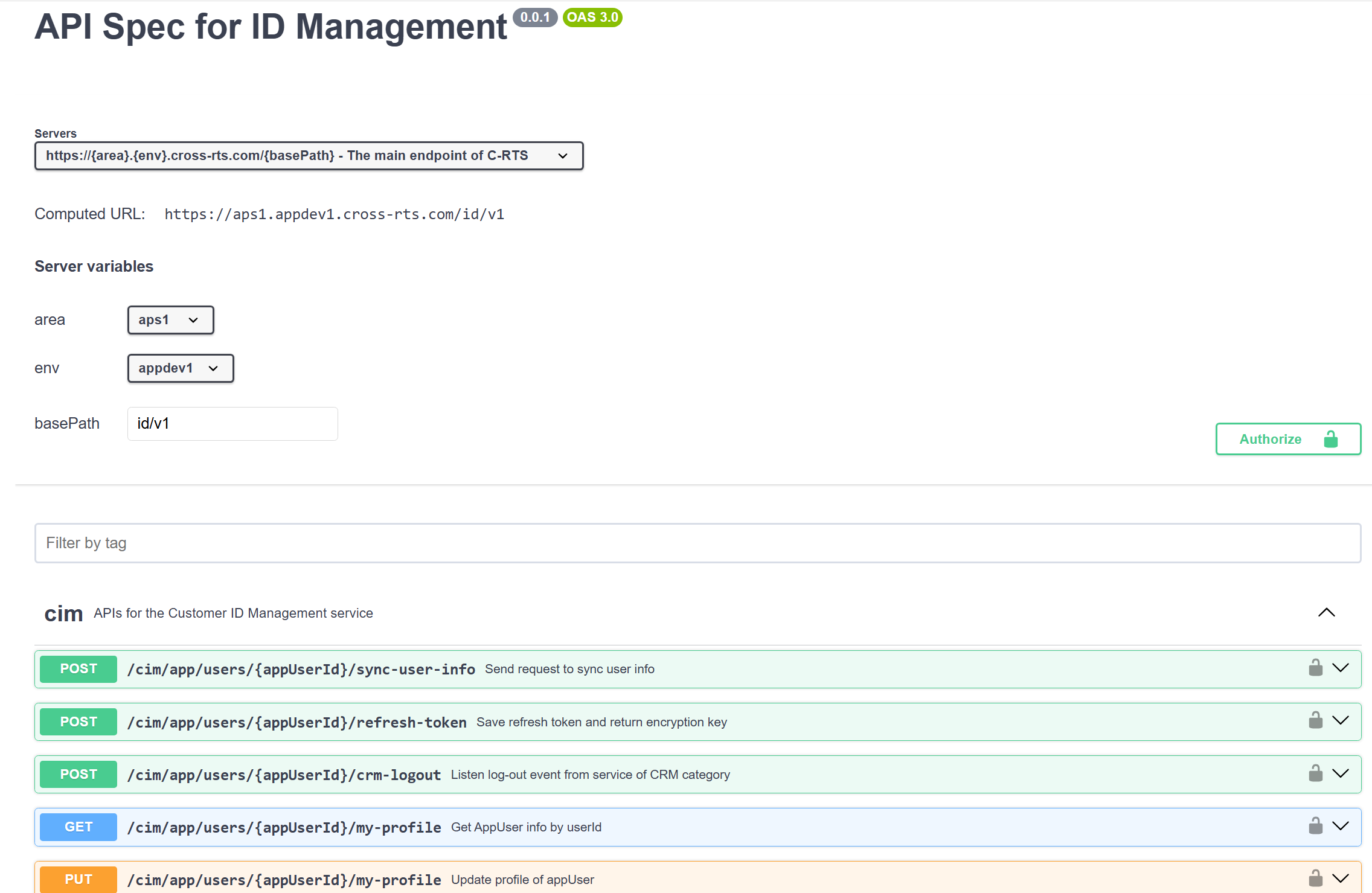
API Spec Swagger Example.
API Security in 2026#
OWASP API Security Top 10 (2025)#
The Open Worldwide Application Security Project maintains the most authoritative list of API vulnerabilities. Key risks for backend developers:
# |
Risk |
Description |
Prevention |
|---|---|---|---|
1 |
Broken Object-Level Authorization |
User accesses another user’s data by changing an ID in the URL |
Always verify the authenticated user owns the requested resource |
2 |
Broken Authentication |
Weak login flows, missing token validation |
Use proven libraries (python-jose, passlib), short-lived tokens |
3 |
Broken Object Property-Level Authorization |
API returns sensitive fields the user should not see |
Use Pydantic |
4 |
Unrestricted Resource Consumption |
No rate limits, unbounded queries |
Rate limiting + pagination on all list endpoints |
5 |
Broken Function-Level Authorization |
Regular user accesses admin endpoints |
Role-based access control on every route |
6 |
Server-Side Request Forgery (SSRF) |
API fetches attacker-controlled URLs |
Validate and allowlist all outbound URLs |
7 |
Security Misconfiguration |
Debug mode in production, verbose errors |
Disable debug, use environment-specific configs |
8 |
Lack of Protection from Automated Threats |
Bots abuse registration, scraping |
CAPTCHA, rate limiting, abuse detection |
CORS (Cross-Origin Resource Sharing)#
CORS controls which domains can make API requests from a browser:
from fastapi.middleware.cors import CORSMiddleware

app.add_middleware(
    CORSMiddleware,
    allow_origins=["https://yourfrontend.com"],  # Never use ["*"] in production
    allow_credentials=True,
    allow_methods=["GET", "POST", "PUT", "DELETE"],
    allow_headers=["Authorization", "Content-Type"],
)
Never set allow_origins=["*"] with allow_credentials=True — this allows any website to make authenticated requests to your API on behalf of your users.
Supply Chain Security#
Third-party dependencies are a growing attack vector. Protect your API:
# Python: Scan dependencies for known vulnerabilities
pip install pip-audit
pip-audit

# Pin exact versions in requirements.txt
pip freeze > requirements.txt

# Use lockfiles (uv.lock, poetry.lock) for reproducible builds
Input Validation Checklist#
Every API endpoint should validate:
Type: Is the input the expected type? (Pydantic handles this)
Length: Is string length within bounds? (
Field(max_length=255))Range: Are numbers within acceptable range? (
Field(ge=0, le=10000))Format: Does email/URL/date match expected format? (
EmailStr,HttpUrl)Authorization: Does the user have access to the referenced resource?
Business rules: Is the booking time in the future? Is the status transition valid?
Summary#
Mastering APIs is about more than just moving data. It’s about designing systems that are predictable (REST), secure (JWT + OWASP), reliable (Rate Limiting), and usable (Documentation). Focus on these pillars, and you will build APIs that other developers love to use.
References#
Practice#
🌐 Base URL#
https://yourapp.com/backend-api/
1. Core Endpoints#
1.1 Generate Message (Send a Message)#
POST
/backend-api/f/conversationUsed to send a message to the assistant and receive the generated response.
Request Body#
{
  "user_id": "user_123",
  "conversation_id": "690d5b6c-02d8-8321-a91e-65ea55b781f7",
  "messages": [
    {
      "id": "msg_001", // If not specified, backend generates a new message ID
      "role": "user",
      "content": {
        "content_type": "text",
        "parts": ["Hello! Can you explain Redis caching?"]
      }
    }
  ],
  "metadata": {
    "temperature": 0.7
  }
}
For Unique Id -> Use uuid
Response (Server-Sent Events Stream)#
event: delta_encoding
data: "v1"

data: {"type": "resume_conversation_token", "token": "eyJhbGciOiJFUzI1NiIsInR5cCI6IkpXVCJ9...", "conversation_id": "690d5b6c-02d8-8321-a91e-65ea55b781f7"}

data: {"type": "input_message", "input_message": {"id": "msg_001", "author": {"role": "user"}, "create_time": 1762484546.479, "content": {"content_type": "text", "parts": ["Can you explain Redis caching?"]}, "status": "finished_successfully"}, "conversation_id": "690d5b6c-02d8-8321-a91e-65ea55b781f7"}

event: delta
data: {"o": "add", "v": {"message": {"id": "msg_002", "author": {"role": "assistant"}, "create_time": 1762484547.338, "update_time": 1762484547.817, "content": {"content_type": "text", "parts": [""]}, "status": "in_progress", "metadata": {"model_slug": "gpt-4-turbo-preview", "parent_id": "msg_001"}}, "conversation_id": "690d5b6c-02d8-8321-a91e-65ea55b781f7"}}

data: {"type": "message_marker", "conversation_id": "690d5b6c-02d8-8321-a91e-65ea55b781f7", "message_id": "msg_002", "marker": "user_visible_token", "event": "first"}

event: delta
data: {"v": [{"p": "/message/content/parts/0", "o": "append", "v": "Redis"}]}

event: delta
data: {"v": [{"p": "/message/content/parts/0", "o": "append", "v": " caching"}]}

event: delta
data: {"v": [{"p": "/message/content/parts/0", "o": "append", "v": " stores"}]}

event: delta
data: {"v": [{"p": "/message/content/parts/0", "o": "append", "v": " frequently"}]}

event: delta
data: {"v": [{"p": "/message/content/parts/0", "o": "append", "v": " used"}]}

event: delta
data: {"v": [{"p": "/message/content/parts/0", "o": "append", "v": " data"}]}

event: delta
data: {"v": [{"p": "/message/content/parts/0", "o": "append", "v": " in"}]}

event: delta
data: {"v": [{"p": "/message/content/parts/0", "o": "append", "v": " memory"}]}

event: delta
data: {"v": [{"p": "/message/content/parts/0", "o": "append", "v": " for"}]}

event: delta
data: {"v": [{"p": "/message/content/parts/0", "o": "append", "v": " fast"}]}

event: delta
data: {"v": [{"p": "/message/content/parts/0", "o": "append", "v": " access."}]}

event: delta
data: {"v": [{"p": "/message/status", "o": "replace", "v": "finished_successfully"}, {"p": "/message/end_turn", "o": "replace", "v": true}, {"p": "/message/metadata", "o": "append", "v": {"is_complete": true}}]}

data: {"type": "message_stream_complete", "conversation_id": "690d5b6c-02d8-8321-a91e-65ea55b781f7"}

data: [DONE]
📖 SSE Stream Explanation#
Event Type |
Purpose |
Why It Matters |
|---|---|---|
|
Declares the streaming protocol version ( |
Allows frontend to handle different streaming formats |
|
JWT token to resume/reconnect to this conversation stream |
Enables connection recovery if stream is interrupted |
|
Echoes back the user’s message that was just sent |
Confirms message received and stored in DB |
|
Creates a new assistant message with empty content and |
Initializes the response container before streaming text |
|
Marks when the first visible token appears |
Frontend can show “typing” indicator until this arrives |
|
Streams individual text chunks (“Redis”, “ caching”, “ stores”…) |
Creates the real-time typing effect by appending words progressively |
|
Updates message status to |
Signals completion so frontend stops showing typing indicator |
|
Confirms the entire message stream is done |
Final acknowledgment that no more deltas are coming |
|
Standard SSE termination signal |
Closes the event stream connection |
🔑 Key Concepts#
Delta Operations:
"o": "add"→ Create new object"o": "append"→ Add text to existing content"o": "replace"→ Update a field value"p": "/message/content/parts/0"→ JSON path to the field being updated
Why Streaming?
User Experience: Shows progress immediately instead of waiting for full response
Perceived Performance: Feels faster even if total time is the same
Long Responses: User sees content as it generates (important for long answers)
Interruptible: User can stop generation early if they got their answer
Notes#
If no
conversation_idis provided → backend creates a new one.Each message (both user & assistant) is stored in the messages table.
The backend can stream responses for real-time UI.
1.2 List Conversations (Conversation History)#
GET
/backend-api/conversations?offset=0&limit=20&order=updatedReturns a paginated list of all conversations for a user.
Response#
{
  "items": [
    {
      "id": "690d5b6c-02d8-8321-a91e-65ea55b781f7",
      "title": "Redis Caching Explained",
      "last_message": "Redis caching stores frequently used data in memory...",
      "updated_at": "2025-11-07T09:30:00Z"
    },
    {
      "id": "732dd789-f512-7e01-b82e-13aa07b4e012",
      "title": "Python Decorators",
      "last_message": "A decorator wraps another function...",
      "updated_at": "2025-11-06T21:00:00Z"
    }
  ],
  "limit": 20,
  "offset": 0,
  "total": 2
}
Notes#
Query params (
offset,limit,order, etc.) make it frontend-friendly.Can be cached with Redis:
Key →
user:{user_id}:conversation_listTTL → 10 min
1.3 Get Conversation Detail#
GET
/backend-api/conversation/{conversation_id}Returns all messages inside a specific conversation.
Response#
{
  "conversation_id": "690d5b6c-02d8-8321-a91e-65ea55b781f7",
  "messages": [
    {
      "id": "msg_001",
      "role": "user",
      "content": {
        "content_type": "text",
        "parts": ["Hello! Can you explain Redis caching?"]
      },
      "created_at": "2025-11-07T09:20:00Z"
    },
    {
      "id": "msg_002",
      "role": "assistant",
      "content": {
        "content_type": "text",
        "parts": [
          "Redis caching stores frequently used data in memory for fast access."
        ]
      },
      "created_at": "2025-11-07T09:22:00Z"
    }
  ]
}
Notes#
Ideal to cache full history:
Key →
conv:{conversation_id}:historyTTL → 10 minutes
2. Database Schema (SQLAlchemy Example Structure)#
Table |
Purpose |
Key Fields |
|---|---|---|
users |
Basic user info |
|
conversations |
Chat sessions |
|
messages |
Chat content |
|
3. Folder Layout (FastAPI-Style)#
app/
├── main.py
├── api/
│   ├── routes/
│   │   ├── conversation.py    # /backend-api/f/conversation, /backend-api/conversations
│   │   └── message.py         # Optional
│   └── dependencies.py
├── core/
│   ├── config.py
│   ├── database.py
│   └── redis_client.py
├── models/
│   ├── user.py
│   ├── conversation.py
│   └── message.py
├── schemas/
│   ├── conversation.py
│   ├── message.py
│   └── user.py
└── services/
│   ├── ai_service.py          # LLM generation logic
│   ├── cache_service.py       # Redis operations
│   └── conversation_service.py # CRUD logic
4. Request Flow Summary#
Frontend sends message via
POST /backend-api/f/conversation→ Backend validates input → fetches conversation → calls AI model → returns response.Frontend loads conversation list via
GET /backend-api/conversations?...→ Fetch from Redis cache → fallback to DB.Frontend loads conversation details via
GET /backend-api/conversation/{conversation_id}→ Return full history (cached or DB).
Review Questions#
Did you notice how standard HTTP methods like GET, POST, PUT, DELETE are used in the endpoints? Why is this important?
A. It makes the API code run faster.
B. It allows the server to store more data.
C. It provides a predictable and uniform interface for developers.
D. It encrypts the user data automatically.
Which of the following HTTP status codes specifically indicates that a resource was successfully created?
A.
200 OKB.
201 CreatedC.
204 No ContentD.
302 Found
In the context of REST APIs, what does “Statelessness” mean?
A. The server does not remember the client state between requests; each request must contain all necessary info.
B. The server never stores data in a database.
C. The API does not have a fixed URL structure.
D. The client does not need to authenticate after the first login.
What is the primary difference between
PUTandPATCH?A.
PUTcreates a resource, whilePATCHdeletes it.B.
PUTis used for partial updates, whilePATCHreplaces the entire resource.C.
PUTreplaces the entire resource, whilePATCHperforms a partial update.D.
PUTis secure, whilePATCHis not.
Which component of a JWT ensures that the token has not been tampered with?
A. The Header
B. The Payload
C. The Signature
D. The Expiration Claim (
exp)
If a JWT is stolen, what is the most effective immediate mitigation if “Refresh Tokens” are NOT used?
A. Change the user’s password.
B. There is no immediate way to revoke a stateless JWT without server-side tracking (blocklist) or waiting for expiration.
C. Delete the user account.
D. Change the API URL.
What is the difference between specific
401 Unauthorizedand403 Forbiddenstatus codes?A. They are interchangeable.
B.
401means the server is down,403means the database is full.C.
401indicates missing or invalid authentication credentials;403indicates the user is authenticated but lacks permission.D.
401is for client errors,403is for server errors.
Which HTTP method is considered “Idempotent” (safe to retry multiple times without changing the result beyond the initial application)?
A.
POSTB.
PUTC.
PATCH(usually, but not strictly required)D. All of the above are always idempotent.
Why is it critical to use HTTPS when using Basic Auth or Bearer Tokens (JWT)?
A. HTTPS increases the speed of the API.
B. HTTPS prevents “Man-in-the-Middle” attacks where the token could be intercepted in plain text.
C. HTTPS compresses the JSON response.
D. It is not critical; HTTP is fine for internal tools.
How does Rate Limiting protect an API?
A. It validates the schema of the JSON body.
B. It prevents abuse (DoS/DDoS) and ensures fair usage by limiting requests per client over time.
C. It encrypts the database connection.
D. It ensures that only admin users can access the API.
When designing a REST API, when should you use Query Parameters (e.g.,
/users?role=admin) vs Path Parameters (e.g.,/users/123)?A. Always use Query Parameters for everything.
B. Use Path Parameters for filtering and sorting, and Query Parameters to identify specific resources.
C. Use Path Parameters to identify a specific resource, and Query Parameters for filtering, sorting, or pagination.
D. Use Path Parameters for secrets (like passwords) and Query Parameters for public data.
What is a “Cross-Origin Resource Sharing” (CORS) error?
A. An error when the database and server are on different time zones.
B. A browser security feature preventing a web page from making requests to a different domain than the one that served the page.
C. An error when two users try to edit the same file at the same time.
D. The API server running out of memory.
View Answer Key
C - Uniform Interface is a key REST constraint.
B - 201 is the specific code for creation.
A - Statelessness enables scalability by removing server-side session storage requirements.
C - PUT is full replacement; PATCH is partial modification.
C - The signature is generated using a secret key to verify integrity.
B - Pure stateless JWTs cannot be revoked easily; short expiration or blocklists are needed.
C - 401 = “Who are you?”; 403 = “I know who you are, but you can’t do this.”
B - PUT requests result in the same state regardless of how many times they are sent. POST is NOT idempotent.
B - Tokens are sent in the header; without HTTPS, anyone sniffing the network can read them.
B - Rate limiting restricts volume to prevent overload.
C - Path = Identity; Query = Modifiers/Filters.
B - CORS is a browser-enforced security boundary.